Contact card
4 min
You can send a WhatsApp contact card using the following command format.
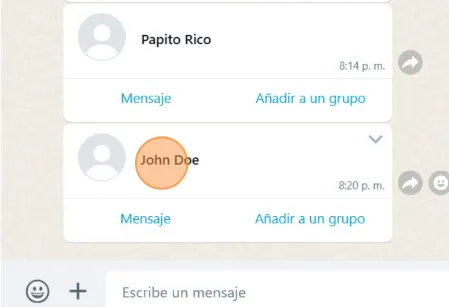
Contact card preview
Command Syntax
#contact|<Name>|<PhoneNumber>
Example
#contact|John Doe|5217778881234
How it works
- #contact → Defines that the message will generate a WhatsApp contact card.
- Name → The full name that will appear on the contact card (e.g., John Doe).
- PhoneNumber → The phone number in international format (include country code, e.g., 521 for Mexico).
Result:
- The recipient will receive a WhatsApp contact card with the name John Doe and the phone number +52 1777 888 1234.
- They can easily save the contact in their phone.
⚠️ Important: Just like with other commands, this must be sent from your CRM integration Conversations tab (e.g., HighLevel), not directly from the WhatsApp mobile app.