Twilio Integration
6 min
Introduction
The Twilio SMS Integration in Wazzap allows you to send SMS messages as a fallback option when WhatsApp is not available for a given contact. This is especially useful in cases where the recipient does not have WhatsApp, ensuring message delivery through SMS.

This integration only supports sending SMS with a command, not receiving. If inbound SMS is required, it must be configured directly with Twilio or through third-party automation platforms like Zapier, Pabbly, or n8n.
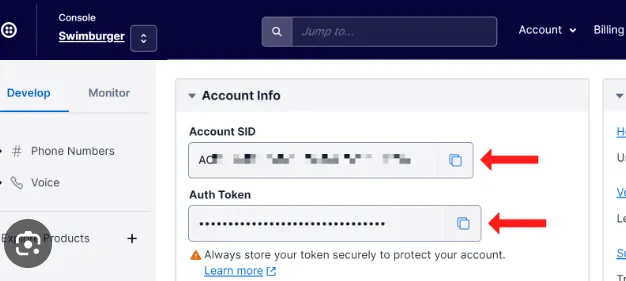
Account SID and Auth Token
How it works
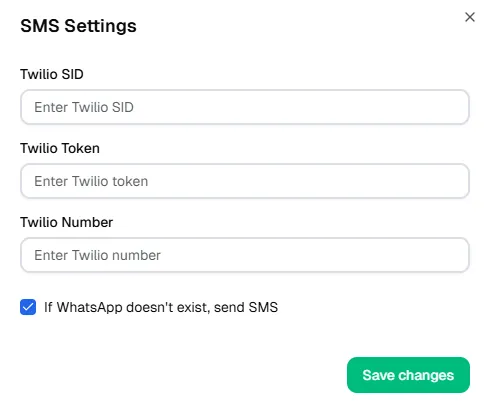
- Wazzap connects to your Twilio account via Account SID, Auth Token, and Twilio Number.
- When WhatsApp is unavailable for a specific phone number, the system can automatically send the message through SMS if the option is enabled.
- Outbound SMS will be delivered using your Twilio number by using the command SMS .
- Inbound SMS is not supported in this integration; to capture replies you must configure Twilio directly (for example, using a Zapier trigger “New Incoming Message Received”) and route those into your CRM.
Setup in Wazzap
- Create a Twilio account here: https://www.twilio.com/referral/uxYKiH
- Once registered, log into the Twilio Console and retrieve:
- Account SID
- Auth Token
- Twilio Number
- In Wazzap, navigate to General Settings > SMS.
- Enter the Twilio SID, Twilio Token, and Twilio Number into the fields.
- (Optional) Enable the checkbox: If WhatsApp does not exist, send SMS.
- Click Save SMS.
- Activate the SMS feature.
Alternative via Highlevel (LeadConnector)
- If your account is managed under GoHighLevel (LeadConnector SMS provider), you can request Twilio credentials directly from Highlevel support.
- These keys can be placed into the same fields in Wazzap.
- Once saved, the integration will allow outbound SMS fallback through LeadConnector’s Twilio infrastructure.
Learn more about Highlevel CRM Integration
If WhatsApp does not exist, send SMS.
- A customer’s phone number is not associated with WhatsApp.
- Wazzap attempts to deliver the message via WhatsApp → fails.
- The system checks the option If WhatsApp does not exist, send SMS.
- The message is sent via Twilio SMS instead, using the registered Twilio Number.
Result
- Messages are delivered as SMS automatically if WhatsApp is not available.
- Outbound communication is guaranteed, avoiding lost interactions.
- Inbound replies are not captured unless configured separately in Twilio.
⚠️ Important Notes
- This integration supports outbound SMS only.
- To receive inbound SMS, configure a direct integration with Twilio (Zapier, Pabbly, n8n, or custom API).
- Ensure that the Twilio Number is SMS-capable before configuration.
- If using Highlevel (LeadConnector), verify with support that your account has SMS enabled and obtain the correct keys.