Calls Webhooks
Introduction
The WhatsApp Call Webhooks feature allows sending real-time notifications to external platforms whenever a WhatsApp call is missed, accepted, rejected, or offered. This is not a voice AI agent; it is strictly a webhook-based event handler. The webhook is especially efficient for managing missed calls, ensuring that no customer interaction is lost.

Configuration Location
The call webhook is configured at number level in Sub-Account panel:
- Navigate to WhatsApp Numbers
- Select the specific WhatsApp number
- Open Settings
- Go to Calls Settings
- Paste the Webhook URL
- Save changes
Each number must be configured independently.
Webhooks
Webhook events that can be configured:
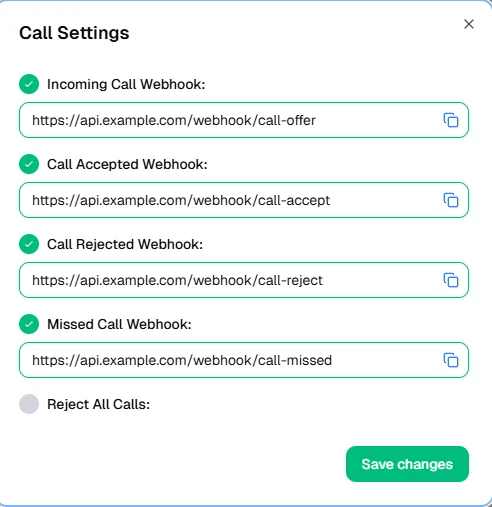
- Incoming Call → Triggered when a call is received.
- Call Accept → Triggered when the call is answered.
- Call Reject → Triggered when the call is declined.
- Call Missed → Triggered when the call is not answered.
Each webhook request will include:
- Phone: Caller’s phone number.
- Country: Caller’s country code.
How it works
- When a WhatsApp call event occurs (offer, accept, reject, missed), Wazzap.mx sends an HTTP request to the configured webhook URL.
- The webhook must be created in an automation platform such as Zapier, Pabbly, GoHighLevel, or n8n.
- The system only activates the webhook once you test it by making a call and performing each action (answer, reject, miss).
- The external platform can then process the payload (phone + country) and trigger further actions such as notifications, task creation, or CRM updates.
In Highlevel, call webhooks can be integrated through an Inbound Webhook Trigger. This functionality is considered a premium action and may incur an additional cost. Please review official Highlevel documentation for pricing details.
The process works as follows (as shown in the diagram):
- Trigger – Inbound Webhook: Activated when Wazzap sends the webhook containing the phone number and country of the call.
- Find Contact: Highlevel checks if the phone number already exists in the contact database.
- Check if Contact Exists:
- Branch: No Exist → If the phone does not exist, proceed to create a new contact.
- Branch: Exists → If the phone exists, proceed to update the contact.
- Create/Update Contact: The system saves the phone and country information from the webhook payload.
- Optional Action – SMS: Send an automated SMS notification or trigger any follow-up workflow.
Example (Highlevel Missed Call)
- A customer calls via WhatsApp but the call is missed.
- Wazzap.mx sends a webhook to Highlevel containing:
- Phone: +521XXXXXXXXXX
- Country: MX
- Highlevel processes the webhook:
- If the phone is new → a contact is created with phone + country.
- If the phone already exists → the existing record is updated.
- Optional: send a Whatsapp or notify the responsible team.
Result
- Every WhatsApp call event is logged in real time via webhook.
- Missed calls automatically create or update contacts, reducing lost leads.
- Teams can respond faster and improve follow-up efficiency.
⚠️ Important Notes
- This feature is not a voice AI; it only sends webhook events for call states.
- Webhooks will only activate after performing live call tests.
- The most valuable use case is for missed calls, ensuring customer callbacks.
- Always configure the webhook in a secure automation platform (Zapier, Pabbly, Highlevel, n8n, etc.).
- The payload currently includes only Phone and Country values; ensure your workflows are designed around these parameters.