Disconnections
Introduction
The WhatsApp Disconnection Webhook feature allows sending a real-time notification to an external platform whenever a WhatsApp account is disconnected, logged out, or loses its active session.
This functionality is designed for monitoring account health and availability, ensuring that teams are immediately alerted when a WhatsApp number goes offline and can take corrective action (re-login, reassignment, or escalation).
This is not a messaging or AI feature; it is strictly a webhook-based notification system triggered by a WhatsApp session disconnection event.
Configuration Location
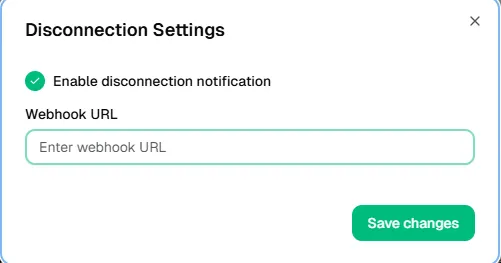
The disconnection webhook is configured at number level in Sub-Account panel:
- Navigate to WhatsApp Numbers
- Select the specific WhatsApp number
- Open Settings
- Go to Disconnection Settings
- Enable Disconnected event
- Paste the Webhook URL
- Save changes
Each number must be configured independently.
Trigger
Webhook event that can be configured:
- Session Disconnected → Triggered when the WhatsApp account logs out, loses session, or is disconnected from the system.
Webhook Payload
Each webhook request will include basic identification data for the disconnected account, such as:
- WhatsApp Account / Phone Number
- Country (if applicable)
- Event Type: Disconnection / Logout
(Exact fields may vary depending on platform version; workflows should be tolerant to minimal payloads.)
How It Works
- A WhatsApp account is disconnected (manual logout, expired session, device change, or system issue).
- Wazzap.mx immediately sends an HTTP request to the configured Disconnection Webhook URL.
- The webhook must be created in an automation platform such as:
- GoHighLevel (GHL)
- Zapier
- Pabbly
- n8n
- The external platform receives the webhook and executes predefined actions (alerts, logs, tasks, or workflows).
Testing the Disconnection Webhook
To test this functionality:
- Create an Inbound Webhook in GoHighLevel (or your automation platform).
- Copy the webhook URL.
- Paste the URL into the Disconnection Settings → Webhook URL field.
- Save changes.
- Manually log out or disconnect the WhatsApp account.
- Confirm that the inbound webhook is triggered and received.
⚠️ Important: The webhook will only fire after a real disconnection event occurs.
HighLevel (GHL) Integration
In Highlevel CRM Integration, the disconnection webhook is implemented using an Inbound Webhook Trigger.
This feature is considered a premium action by HighLevel and may incur additional costs. Please verify pricing in the official HighLevel documentation.
Recommended Flow in HighLevel
- Trigger – Inbound Webhook Activated when Wazzap.mx sends the disconnection event.
- Identify Account / Phone Match the incoming phone number or WhatsApp identifier.
- Update Status
- Mark WhatsApp account as Disconnected / Offline
- Optionally tag the account (e.g., WA_Disconnected)
- Notification Actions (Optional)
- Send internal Slack / Email / SMS alert
- Create a task for reconnection
- Notify the assigned agent or admin
Example (HighLevel WhatsApp Disconnection)
A WhatsApp account is logged out due to session expiration.
Wazzap.mx sends a webhook to HighLevel containing:
- Phone: +521XXXXXXXXXX
- Country: MX
- Event: Disconnected
HighLevel processes the webhook:
- Identifies the WhatsApp account
- Updates status to Disconnected
- Sends an internal alert to the operations team
- Optionally creates a task to reconnect the account
Result
- WhatsApp disconnections are detected in real time.
- Teams are immediately notified when an account goes offline.
- Downtime is reduced by faster response and reconnection.
- Operational visibility and system reliability are improved.
⚠️ Important Notes
- This feature does not send messages; it only reports session disconnections.
- Webhooks trigger only on real logout or disconnection events.
- Always test using a real WhatsApp logout.
- Configure the webhook in a secure automation platform (HighLevel, Zapier, Pabbly, n8n).
- Design workflows to handle minimal payload data gracefully.