Send Source
8 min
Introduction
Send Source is a feature that automatically attaches the origin of each incoming message by tagging it with the source name. When enabled, every message received in the CRM will include the Source: label indicating from which phone line it was sent. This information is only visible internally in the CRM and never shown to the customer in WhatsApp.
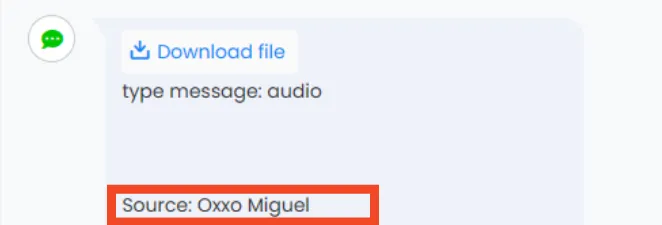
Customer replied
Command Syntax
- Format of the tag inserted internally:
- Source: {NumberName}
- Recommended filter pattern in CRM automations:
- Customer replied → Contains phrase → Source: {NumberName}
How it works
- Wazzap.mx adds a metadata tag at the beginning of each message with the text Source.
- This metadata is not visible in WhatsApp; it only appears in the CRM conversation timeline.
- The tag can be used to classify, route, or trigger actions depending on the CRM’s capabilities.
Setup with Highlevel CRM Integration
- Go to Automation > Workflows > Create Workflow.
- Trigger: select Customer Replied → set Channel = SMS. (In Highlevel, WhatsApp traffic through Wazzap is handled as SMS, so this trigger is required.)
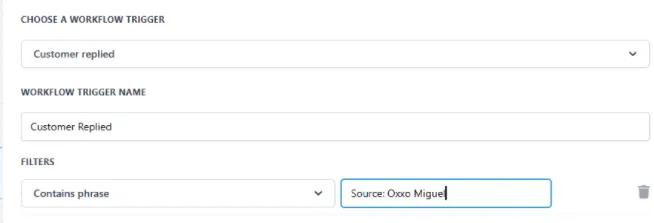
Highlevel Trigger
- Filters: add condition Contains phrase and type exactly: Source: Oxxo Miguel.
- Actions (examples):
- Add Tag → source_oxxo_miguel.
- Assign User → Assign to the responsible user/team.
- Move to Pipeline/Stage → Place into the corresponding pipeline.
- Publish the workflow.
Example
- Number in Wazzap: Oxxo Miguel.
- Customer replies on WhatsApp through that line.
- In Highlevel, the received message contains:
- Source: Oxxo Miguel
- The Workflow with filter Contains phrase = Source: Oxxo Miguel triggers and processes the conversation accordingly.
Result
- Replied message shows the Source: metadata at the start of the message (internally only).
- The Workflow triggers only for the configured source number.
- The conversation is routed, tagged, and assigned based on the defined rules.
⚠️ Important Notes
- The tag Source: is not visible to the customer in WhatsApp; it only appears in the CRM.
- The filter Contains phrase is case and spacing sensitive; copy it exactly as generated.
- The Source name is the phone’s name defined in Wazzap settings.
- If you change the line’s name in Wazzap, you must update the filters in the CRM accordingly.
- For accounts with high volume, maintain a mapping table of number → assigned team and keep it version-controlled in internal documentation.