Location card
5 min
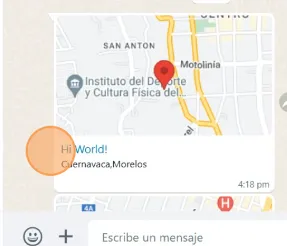
You can send a WhatsApp location card by including latitude and longitude coordinates in your command.
Command Syntax:
#location|<Latitude>|<Longitude>|<Message>|<Address>
Example
#location|18.915977|-99.238823|Hi World!|Cuernavaca, Morelos
How it Works
- #location → Defines that the message will generate a WhatsApp location card.
- Latitude & Longitude → Exact coordinates of the location.
- Message → Custom text that will appear with the location (e.g., Hi World!).
- Address → A descriptive label or address for the location (e.g., Cuernavaca, Morelos).
Finding Coordinates in Google Maps
- Open the location in Google Maps.
- Look at the URL in your browser — you will see the latitude and longitude values.
- Latitude = 19.395902Longitude = -99.1783344
Result
- The recipient will receive a WhatsApp location card.
- They can tap it to open Google Maps and navigate to the exact point.
⚠️ Important: Just like with other commands, this must be sent from your CRM integration Conversations tab (e.g., HighLevel), not directly from the WhatsApp mobile app.