GHL White-Label URL
3 min
The Custom Link Global option is designed exclusively for HighLevel integration. It allows you to provide your clients with a whitelabel QR code experience inside their HighLevel account, without Wazzap branding.
Requirements
- You must have a HighLevel Agency account.
- You can sign up with this special deal, which includes a 30-day free trial and extra bonuses.
- Learn more about the integration here: Highlevel CRM Integration
Creating a Custom Menu Link in HighLevel
- Go to your HighLevel Agency Settings.
- Navigate to Custom Menu Link in the sidebar.
- Click Create New.
- Enter the Wazzap Whitelabel URL that you can find in your Admin Panel.
- Admin Panel in the upper-left corner.
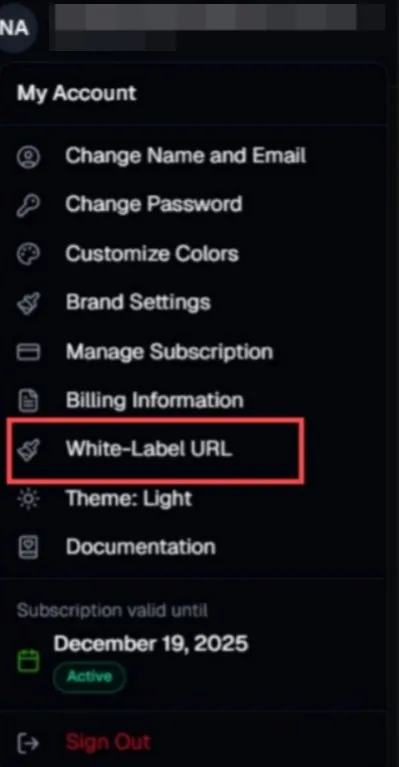
Admin Panel White-Label URL
- Enable Show link on Account sidebar.
- Assign the link to the HighLevel subaccounts where you want the QR code to appear.
Client Experience
- Clients will see the Wazzap QR interface directly inside their HighLevel subaccount.
- They can scan the QR code with their own phone.
- The setup is fully whitelabel, meaning there is no Wazzap branding visible.
Outcome
With this configuration, your clients can self-activate Wazzap by scanning the QR code inside HighLevel, with no brand exposure, ensuring a seamless whitelabel experience.